Customer service scheduling software
Enable support agents to confirm customer appointments without the back and forth.

Enable support agents to confirm customer appointments without the back and forth.

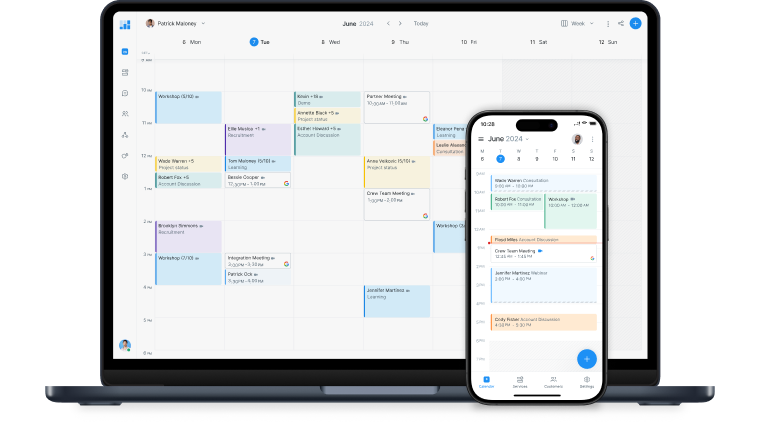
When agents schedule an appointment online, the details land in your calendar right away.
Set up your Booking Page and allow help desk agents to confirm customer appointments over calls and live chat.
Agents can view when the most relevant specialist is available and ensure the customer gets a spot in their calendar.
Your help desk scheduling software handles routine admin, sending email or text reminders to every customer.
Add your Booking Page link to your website, emails and social media for customers to schedule at their convenience.
Your help desk agents can book video calls to reduce travel and connect specialists to a global customer base.
Setmore’s customer service is always the same no matter the time of day: speedy and results-driven help.
―consumers want an omnichannel experience with seamless service.*
Using help desk booking software, you can ensure that confirming appointments is simple over calls, through emails and chats, across social media, and more.
*CX Today
Get booked directly from your Facebook business profile.
Add download-free 1-click video meetings to your appointments.
Encourage new bookings by streaming posts to your Booking Page.
Enable your helpdesk to schedule while responding to tickets.
Empower your audience to book in seconds, directly from Messenger.
Sync calendar events between Google and Setmore.
When a customer contacts your support agents, you want to ensure a timely response and resolution. In the event that they need another specialist, ensure agents can open your Booking Page and confirm appointments as soon as possible.
Your real-time availability is displayed, helping to reduce wait times and close tickets faster. New appointment details drop right into your calendar.
Statista reports that 88% of consumers expect businesses to provide online self-service options. As your Booking Page is public-facing, customers can schedule appointments independently, without contacting your help desk.
Share your Booking Page link directly across DMs, emails and social media, and feature a ‘Book now’ button on your website.
Your Booking Page can display multiple team members, enabling help desk agents to match customers to the right specialist.
When an appointment is scheduled using your Booking Page, the specialist and guest receive instant email confirmations. And, on the lead-up to their appointment, your guest also receives an email or text reminder to cut down on no-shows.
Have a large team to schedule? Meet with us to create a custom plan that suits your processes and goals.
Explore EnterpriseFeature a booking button in the Intercom home screen. Customers can chat with your team and book appointments in one go.
Learn moreYour Booking Page and calendar are synced, updating your availability in real-time. Agents can schedule appointments around your other events.
Whether a customer needs to book an initial appointment or follow-up, make it straightforward with a ‘Book now’ button for your website.
When a customer reaches out with a question or issue, ensure they can confirm an appointment without leaving their social media app.
Simply enable the Zoom or Google Meet integration and select services to provide virtually. When booked, a video link is automatically included in email confirmations to the specialist and guest.
Yes, you can give specific agents access to your Setmore calendar. Your Booking Page is public-facing, so anyone can access it to confirm appointments. Your calendar is only open to you and the team members you permit.
To access your calendar, a help desk agent requires a team login and either receptionist or admin permission. Learn more about permission levels for your online scheduling and customer service software.
Yes, Setmore connects to Freshdesk, Zendesk, Zoho CRM, Salesforce and many more software solutions.
Yes, you can edit the URL so your Booking Page displays in more than 30 languages.
No, if using your Booking Page to schedule appointments, agents do not require individual accounts. However, if you’d like agents to use your calendar, they’ll need team profiles. You can add as many team profiles as needed to one Setmore account.
Read more about plans for your help desk calendar scheduling software.
For more information, check out our Support Center.